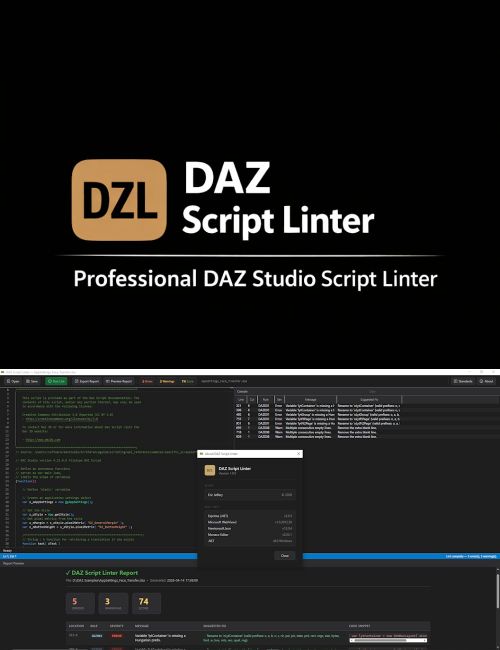
DAZ Script Linter is a Windows desktop application for writing and validating DAZ Studio script files (.dsa) against official DAZ 3D internal coding standards.
Features
- Full Monaco Editor (Visual Studio Code engine) with JavaScript syntax highlighting, line numbers, and live cursor tracking
- Static analysis engine checks code against DAZ 3D naming conventions, formatting rules, and structural requirements
- Side-by-side editor and results console with a draggable splitter
- Double-click any console row to navigate directly to that line in the editor, with the full line selected
- Actionable fix suggestions for every violation, including type inference to recommend the correct Hungarian prefix based on the variable initializer
- Compliance score (0 – 100) with green, amber, and red status indicators
- Export lint results as a styled HTML report with timestamps, severity badges, and fix suggestions
- Inline report preview panel with no browser required
- DAZ Script compatibility, including support for catch(...) syntax and implicit string concatenation that standard JavaScript parsers reject
- Coding standards quick-reference panel covering Hungarian prefixes, scope prefixes, naming conventions, formatting, and commenting guidelines
- Automatic linting when files are opened or saved
- All editor assets are bundled locally, with no internet connection required
Rules Checked
- Missing Hungarian type prefix
- Not lowerCamelCase
- Invalid single-letter variable name
- Global variable missing g_ prefix
- Function name not lowerCamelCase
- Space indentation instead of tabs
- Nested statement missing braces
- Multiple consecutive blank lines
- Function missing separator comment
System Requirements
Windows 10 (build 17763) or later, .NET 8.0 Runtime, and Microsoft WebView2 Runtime.
What's Included and Features
- DAZ Script Linter
- DAZ Script Linter application
- 11 Page User Manual
Install Types:
DazCentral, DIM, Manual Install
Daz3d
Where to buy:
https://www.daz3d.com/daz-script-linter